Configuring Syslog Viewer's Listening Port and Interface
By default, Syslog Viewer listens on UDP port 514 of the computer or machine on which it's installed. By default, Syslog Viewer also listens on all interfaces if the computer or machine has more than one NIC, for example.
You can configure a secure syslog connection using TLS. By default, when TLS is enabled, Syslog Viewer uses the device's default self-signed certificate (TLS Context #0). However, if you want to use a non-default TLS certificate, you need to configure it on the device and on Syslog Viewer.
|
●
|
Syslog Viewer (starting from Version 1.50) can collect syslog messages over TLS. |
|
●
|
You can receive syslog messages from the same IP address with two different transport protocols - one through UDP and the other through TCP/TLS. On the device, use the Syslog Servers table to configure two rows, one for UDP and one for TCP/TLS. |
|
➢
|
To configure Syslog Viewer's listening port: |
|
1.
|
On the toolbar, click the Options  icon; the Options dialog box appears. icon; the Options dialog box appears. |
|
2.
|
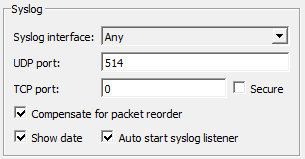
Under the Syslog group, do the following: |
|
a.
|
From the 'Syslog interface' drop-down list, select the interface that Syslog Viewer listens to. |
|
b.
|
In the 'UDP port' or 'TCP port' fields, enter the UDP or TCP port (respectively) that Syslog Viewer listens to. |
|
c.
|
If you want a secured (TLS) syslog connection, in the 'TCP port' field, enter the secured listening port, and then select the 'Secure' check box. |
|
3.
|
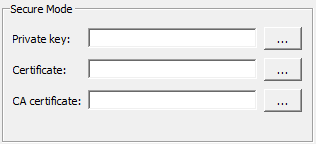
If you are using TLS and want to use a non-default TLS certificate, then after configuring the TLS port in Step 2.c, under the Secure group, do the following: |
|
a.
|
In the 'Private key' field, click the ellipsis (…) button, and then browse to and select the TLS private key file. |
|
b.
|
In the 'Certificate' field, click the ellipsis (…) button, and then browse to and select the TLS certificate file. |
|
c.
|
In the 'CA certificate' field, click the ellipsis (…) button, and then browse to and select the Certificate Authority (CA) file. |
You must configure the device with a TLS Context that includes these non-default TLS certificates.